How to Define QA Scope for a Website Project
What Is QA Scope?
QA scope defines exactly what will — and will not — be tested during a website QA cycle.
It sets the boundaries of testing before execution begins.
A clear scope answers questions such as:
What pages are included?
Which user journeys are critical?
Which browsers and devices need coverage?
Are forms, integrations, accessibility, security sanity checks, or analytics included?
What is explicitly excluded?
Without a defined scope, website testing can easily become inconsistent.
One tester may assume every page needs full browser coverage.
Another may focus only on new functionality.
A stakeholder may believe accessibility was tested even though it was never part of the QA cycle.
Defining scope removes this ambiguity.
For a broader framework around the complete QA planning process, see How to Create a Website QA Test Plan.
Why QA Scope Matters
A website project rarely has unlimited testing time.
Even a relatively simple site may contain:
pages, forms, components, browsers, devices, integrations, responsive states, and content variations.
A larger SaaS or e-commerce project may contain hundreds of possible combinations.
QA scope helps the team decide where testing effort provides the most value.
It also makes the final QA result more meaningful.
Instead of saying:
Website QA completed.
you can say:
QA covered the primary website pages, lead-generation forms, responsive layouts, Tier 1 browsers, accessibility sanity checks, and production release readiness.
That statement tells stakeholders what was actually verified.
QA Scope Is Not the Same as “Test Everything”
A common mistake is defining scope as:
Test the whole website.
That sounds comprehensive but is not operationally useful.
What does “whole website” mean?
Does it include:
third-party systems?
every browser?
every viewport?
all CMS roles?
SEO configuration?
accessibility?
security?
analytics?
performance?
Without more detail, different people can interpret the same scope differently.
A useful QA scope breaks the project into specific areas and defines the expected depth of coverage.
Start With the Purpose of the Website
Before deciding what to test, understand what the website exists to do.
A marketing site may primarily need to:
generate leads.
An e-commerce site needs to:
sell products.
A SaaS application may need users to:
sign up, authenticate, and complete a core workflow.
A booking platform may need users to:
find availability and complete a reservation.
The most important QA coverage should reflect the website’s business purpose.
If the primary business objective fails, the release is not successful even if dozens of secondary pages work perfectly.
Identify the Critical User Journeys
Critical user journeys are the workflows users must be able to complete successfully.
For a lead-generation website, a journey might be:
Homepage → Service Page → Contact Form → Confirmation → Lead Received
For e-commerce:
Product → Cart → Checkout → Payment → Order Confirmation
For SaaS:
Signup → Verify Email → Login → Core Action → Save
These journeys should normally receive deeper coverage than low-risk content pages.
They also become useful later when assessing release readiness.
Define the Pages in Scope
Identify which pages or page templates need testing.
For a typical website, this might include the homepage, pricing, service pages, contact pages, resource pages, authentication screens, legal pages, and important landing pages.
But not every URL necessarily needs identical coverage.
If 100 blog posts use the same template, you may not need to manually test all 100 with the same depth.
A more efficient approach may be to verify:
the template, several representative posts, special content variations, and critical links.
This is why scope should consider templates and functionality, not only raw page count.
Define Features and Components in Scope
Websites often reuse components across multiple pages.
Examples include navigation, forms, accordions, tabs, modals, cards, filters, search, pagination, sliders, and CTA blocks.
Testing these components once may not always be enough.
The same component can behave differently depending on:
content length, viewport, page template, browser, or surrounding layout.
Scope should identify which reusable components are important enough to receive dedicated QA coverage.
Define Functional Testing Scope
Functional testing asks whether the website behaves correctly.
Typical areas may include navigation, buttons, links, forms, search, filters, authentication, checkout, downloads, uploads, and interactive components.
For each important feature, think beyond the successful path.
For example, testing a form may include:
valid submission, missing required fields, invalid email, server failure, confirmation behavior, and actual delivery of the submitted data.
The right depth depends on business risk.
Define Responsive Testing Scope
Responsive QA should not simply mean:
Check mobile.
Define which layout ranges matter.
For example:
small mobile, standard mobile, tablet, laptop, and large desktop.
You should also consider important breakpoint boundaries.
A layout that works at 767px and 769px but breaks at 768px is still a real defect.
Responsive scope may also include portrait and landscape behavior where relevant.
Define Browser and Device Scope
Browser coverage should be intentional.
Do not simply test Chrome because it is convenient.
Select browsers and devices based on:
audience, analytics, project requirements, historical bugs, and risk.
A primary environment may receive full critical-flow coverage, while a secondary browser receives a lighter compatibility pass.
This is more efficient than testing every environment with identical depth.
For a practical method, see Browser and Device Test Matrix: How to Choose What to Test.
Define Real Device Coverage
Browser emulation is useful, but it does not perfectly reproduce a real device.
Important mobile workflows may require testing on physical devices.
Real-device coverage is particularly valuable for:
mobile Safari, touch behavior, virtual keyboards, checkout, authentication, file uploads, and complex forms.
Your scope should state when emulation is sufficient and when real-device verification is expected.
Define Form Testing Scope
Forms often deserve specific attention because they connect the frontend to business processes.
A form may look successful while the submitted data never reaches its destination.
For important forms, QA scope may include:
frontend validation, successful submission, error handling, notification emails, CRM integration, spam protection, and mobile usability.
For a lead-generation site, forms may be among the highest-risk areas in the entire scope.
Define Authentication Scope
If users can create accounts or sign in, authentication needs clear coverage.
This may include signup, email verification, login, logout, password reset, session handling, protected pages, and user roles.
Authentication should not be represented by a vague line such as:
Login tested.
Define what parts of the account lifecycle matter.
For deeper coverage, see How to Test Login, Signup and Password Reset Flows.
Define E-commerce Scope
E-commerce sites require more than page-level testing.
Scope may include product discovery, product variants, inventory, cart, coupons, shipping, tax, checkout, payment, confirmation, order creation, transactional email, and customer accounts.
Because these workflows directly affect revenue, they usually deserve high priority.
For a broader framework, see E-commerce Website Testing Checklist: What to Test Before Launch.
Define Integration Scope
Modern websites often depend on external systems.
Examples include CRM platforms, payment providers, email services, analytics, booking systems, maps, chat widgets, authentication providers, and APIs.
Do not assume that an integration is outside QA simply because another company provides it.
The integration point still affects the user journey.
For each important integration, define whether QA will verify:
the frontend response only, the full end-to-end flow, the third-party result, or production behavior.
Define Accessibility Scope
Accessibility is another area that should be explicitly scoped.
A lightweight accessibility QA pass may include:
keyboard navigation, focus visibility, form labels, color contrast, heading structure, image alternatives, zoom/reflow, and mobile interaction.
A formal accessibility audit is much deeper.
Do not use a general statement such as:
Accessibility tested.
unless everyone understands what that means.
For practical website QA coverage, see Website Accessibility Testing Checklist: A Practical QA Guide.
Define Security Sanity Scope
Routine QA is not penetration testing.
However, basic security-related behavior can still be part of the scope.
Examples include:
HTTPS, authentication, protected routes, permissions, logout behavior, sensitive error messages, debug output, and obvious data exposure.
Clearly describe this as security sanity testing rather than a comprehensive security audit.
For a practical baseline, see Website Security QA Checklist: Basic Checks Before Launch.
Define Content QA Scope
Content testing can include much more than spelling.
Depending on the project, it may cover:
headings, links, images, downloadable files, contact details, pricing, CTAs, legal content, placeholder text, and consistency.
For some projects, detailed editorial proofreading may be outside the QA team’s responsibility.
If so, say so.
Otherwise stakeholders may assume that every word on every page was reviewed.
Define SEO Sanity Scope
QA may include technical SEO sanity checks without becoming a full SEO audit.
Useful checks may include:
indexing settings, robots directives, sitemap, canonical URLs, page titles, staging URLs, redirects, and basic metadata.
The scope should distinguish between:
release QA for obvious SEO configuration problems
and:
comprehensive SEO strategy or audit.
These are not the same service.
Define Analytics and Tracking Scope
Tracking errors may not visibly break the website, but they can damage reporting from the moment the site launches.
If analytics is important, define whether QA includes:
page views, forms, purchases, conversion events, tag-manager configuration, or production verification.
For e-commerce, duplicate purchase events can be especially problematic.
For lead-generation sites, a form that submits correctly but fails to record a conversion may still create a business issue.
Define Performance Scope
Performance can mean several different things.
It might include:
basic page-load sanity checks, Core Web Vitals, detailed frontend profiling, load testing, or infrastructure performance testing.
Do not write simply:
Performance included.
Define what level of testing is expected.
A standard website QA cycle may only check for obvious performance problems.
Formal load or stress testing may be a separate scope entirely.
Define CMS and Admin Scope
If the project uses WordPress or another CMS, decide whether QA includes only the public website or also administration workflows.
CMS scope may include:
creating content, editing content, publishing posts, uploading media, user roles, reusable components, categories, and plugin-driven workflows.
For WordPress-specific coverage, see WordPress QA Checklist: What to Test Before Going Live.
Define User Roles
Web applications may behave differently depending on the authenticated role.
Examples include:
administrator, manager, editor, standard user, customer, or guest.
A page may work correctly for an Administrator while failing for a normal user.
If roles matter, list them in the scope.
Then identify which critical workflows need to be verified for each role.
Define Environment Scope
QA should state where testing occurs.
Examples:
development, staging, UAT, or production.
This matters because some functionality may behave differently in production.
For example:
payment gateways, email delivery, caching, analytics, APIs, and authentication callbacks.
A useful model may be:
Full QA on staging + focused smoke testing on production
rather than pretending the two environments are identical.
Define Production Verification Separately
Production QA should usually be smaller and more focused than the full pre-release cycle.
Its purpose is to verify that deployment did not introduce a production-specific failure.
For example:
homepage, primary form, login, checkout, integration, and analytics.
For a practical production checklist, see Post-Deployment Smoke Testing: What to Check After Release.
Define Test Data Requirements
Testing often requires specific data.
Examples include:
user accounts, admin accounts, products, coupons, test cards, addresses, subscriptions, uploaded files, and CRM records.
If test data is unavailable, part of the planned scope may become impossible to execute.
QA planning should therefore identify required data before the test cycle begins.
Define What Is Explicitly Out of Scope
Out-of-scope items are one of the most important parts of a QA scope.
Examples may include:
penetration testing, load testing, unsupported browsers, third-party internal systems, translation quality, legal review, or unsupported devices.
Documenting exclusions does not weaken QA.
It makes the result accurate.
Without exclusions, stakeholders may assume coverage that never happened.
Out of Scope Does Not Mean Unimportant
Something can be important and still be outside the current QA scope.
For example:
a formal penetration test may be very important for a financial application.
But it may be performed by a specialist security team rather than the website QA team.
The correct approach is not to pretend it was tested.
The correct approach is to document ownership and scope clearly.
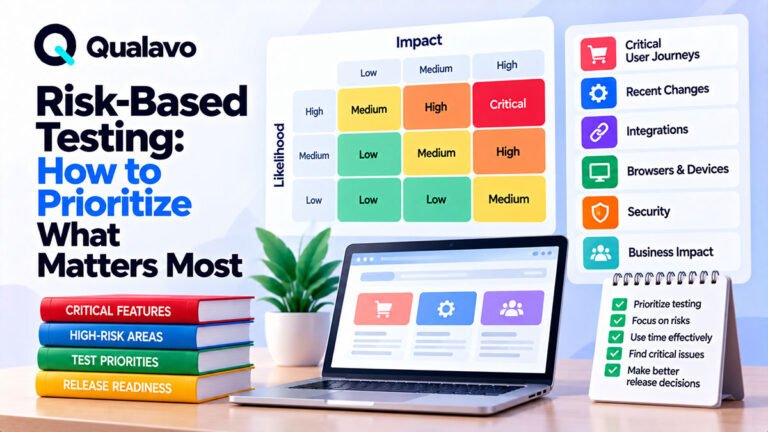
Use Risk to Decide Testing Depth
Not every feature needs identical depth.
Consider:
Impact × Likelihood
A checkout change used by every customer may need extensive testing.
A spacing change on a rarely visited information page may need much less.
Risk factors may include:
business impact, usage frequency, complexity, recent changes, integration dependencies, previous defect history, and data sensitivity.
This helps allocate limited QA time intelligently.
Pay Extra Attention to Recently Changed Areas
Regression risk is usually higher where code or configuration changed.
If the release modifies:
authentication, checkout, navigation, responsive CSS, or integrations,
those areas deserve extra coverage.
The scope can therefore include both:
baseline regression coverage
and:
release-specific coverage
This avoids rerunning the entire application at maximum depth after every small release.
Use Historical Defects to Improve Scope
Previous defects are valuable planning data.
If Safari has repeatedly exposed problems, strengthen Safari coverage.
If CRM integration often fails after deployment, include it in production smoke testing.
If mobile forms frequently break, increase mobile form coverage.
A mature QA scope evolves based on actual project history.
Match Scope to Available Time
Sometimes the ideal scope is larger than the available release window.
Do not silently reduce testing.
Instead, reprioritize.
Focus first on:
critical user journeys, high-risk functionality, important browsers, major integrations, and recent changes.
Then document any reduced coverage.
This is much safer than claiming the original scope was completed when it was not.
Define QA Responsibilities
Scope should also clarify ownership.
Who tests?
Who fixes?
Who retests?
Who verifies integrations?
Who approves known issues?
Who makes the final release decision?
Unclear responsibilities can create gaps even when the technical scope is well defined.
Define the Defect Process
The testing scope should connect to the defect workflow.
A standard process might be:
Report → Triage → Fix → Retest → Close
Defects should use consistent severity and reporting standards.
For a practical structure, see Bug Report Template: What Every Defect Report Should Include.
Define Retest Scope
Testing is not complete when defects are reported.
Important fixes need retesting.
The scope should identify whether retesting includes:
only the original defect,
the affected workflow,
or broader regression coverage.
The right depth depends on risk.
A small text correction may require minimal retesting.
A checkout logic change may require the full transaction flow again.
Define Regression Scope
Regression testing checks whether changes broke existing functionality.
A reusable regression baseline may contain:
navigation, forms, authentication, checkout, critical integrations, and core business workflows.
Do not automatically run every possible test after every change.
Use a stable baseline plus release-specific risk coverage.
Define Entry Criteria
QA scope becomes easier to execute when the team agrees when testing can begin.
Typical entry criteria may include:
stable staging build, required features available, test accounts ready, required integrations configured, and known development blockers resolved.
Starting QA too early often creates wasted effort and invalid defects.
Define Exit Criteria
Exit criteria answer:
When is this QA cycle complete?
Examples may include:
planned scope executed, critical workflows passing, blocking defects resolved, important fixes retested, known issues documented, and release recommendation prepared.
Exit criteria connect scope directly to release readiness.
Connect Scope to Go/No-Go Decisions
A release decision should be based on the agreed QA scope.
If critical areas were excluded or could not be tested, that uncertainty should be visible.
Before launch, compare:
planned scope, executed scope, open defects, known limitations, and remaining risk.
For a practical release framework, see Go/No-Go Checklist: Is Your Website Ready to Launch?.
Document Deviations From Scope
Real projects change.
A browser may become unavailable.
A third-party sandbox may fail.
A new feature may arrive late.
A test environment may become unstable.
When this happens, update the scope or final report.
For example:
Safari iPhone checkout testing was not completed because the payment provider’s test environment was unavailable. Production verification remains required.
This is far more useful than simply marking QA “complete.”
Keep Scope Understandable to Stakeholders
The scope should not require specialist QA knowledge to interpret.
Instead of:
Functional and non-functional validation performed.
say:
QA includes critical website workflows, forms, responsive layouts, supported browsers, accessibility sanity checks, and production smoke testing.
Clear language reduces misunderstandings.
Example QA Scope for a Marketing Website
A typical marketing-site scope might include:
primary pages, navigation, lead forms, responsive behavior, agreed browsers, basic accessibility, basic SEO configuration, analytics, and production smoke testing.
Out of scope might include:
penetration testing, load testing, CRM internal workflows, and formal accessibility certification.
The critical journey might be:
Homepage → Service Page → Contact Form → Lead Received
This is much more actionable than simply saying:
Test the website.
Example QA Scope for E-commerce
An e-commerce scope may prioritize:
product discovery, product pages, cart, checkout, payment, shipping, taxes, coupons, order creation, confirmation email, inventory, customer accounts, priority mobile browsers, and production transaction verification.
This is deeper because transaction failures directly affect revenue.
Example QA Scope for SaaS
A SaaS scope may include:
signup, login, permissions, CRUD workflows, search, filters, user roles, subscription behavior, integrations, responsive support, security sanity checks, and regression testing.
A web application typically needs deeper state and permission testing than a static website.
Example QA Scope for WordPress
A WordPress project may include:
public pages, forms, theme components, plugins, responsive behavior, user roles, SEO settings, caching, analytics, and production email.
The exact scope depends heavily on which plugins and custom workflows are used.
A Practical QA Scope Template
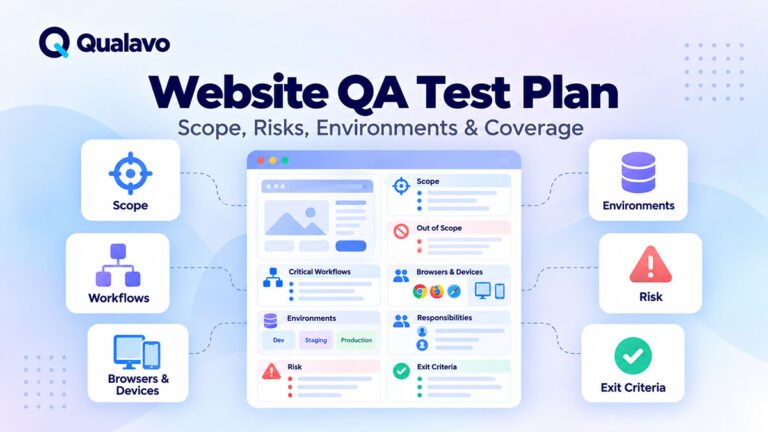
For most projects, the scope document should define the project objective, critical user journeys, pages/templates, features, environments, browsers/devices, integrations, test types, user roles, test data, exclusions, risks, responsibilities, entry criteria, exit criteria, and production verification.
It does not need to become a large formal document.
The important thing is that everyone understands the boundaries.
Avoid Scope Creep
Scope creep happens when new testing expectations appear during execution without adjusting:
timeline, resources, or priorities.
Examples:
Can you also test every tablet?
Can you audit accessibility too?
Can you test the entire admin area?
These may be legitimate requests.
But they change the scope.
Treat them explicitly.
Do not silently absorb unlimited additional testing.
Avoid Defining Scope Too Narrowly
The opposite problem also exists.
A scope that says:
Homepage, Contact, About.
may miss the actual business workflow.
For example, it may not mention:
form delivery, mobile navigation, browser coverage, or production configuration.
Scope should describe behavior and risk, not only page names.
Do Not Measure Scope Only by Page Count
Twenty pages do not necessarily require more QA than five complex pages.
One SaaS dashboard with multiple roles and dynamic workflows can require more testing than dozens of static content pages.
Complexity matters.
Business impact matters.
State matters.
Integrations matter.
Page count alone does not describe QA effort.
Report Actual Coverage at the End
At the end of QA, compare the planned scope with what was actually executed.
The final report should make clear:
what was tested, what could not be tested, what failed, what remains open, and what the release risk is.
For client-facing reporting, see How to Write a Website QA Report for Clients.
Make QA Scope Repeatable
A reusable process can look like:
Understand the Project → Identify Critical Journeys → Define Test Areas → Select Environments → Define Exclusions → Prioritize Risk → Execute → Report Actual Coverage
This keeps website QA focused and predictable.
Over time, teams can reuse the same baseline while adapting it to each project.
Qualavo Starter is designed to support structured QA planning, browser/device coverage, defect handling, and release readiness.
For more complex projects requiring deeper testing modules, accessibility, security sanity checks, SaaS, e-commerce, and client reporting, Qualavo Professional extends that workflow further.
Final Thoughts
A strong website QA scope answers a simple question:
What exactly are we responsible for verifying before this release?
Define:
critical workflows, pages, features, browsers, devices, integrations, test types, exclusions, risks, and production verification.
Do not promise “complete testing” without defining what complete means.
Do not spend equal effort on every part of the website.
Focus more deeply on the areas where failure would matter most.
When scope is clear, testing becomes easier to plan, easier to execute, and easier to communicate.
And when release day arrives, the team has a much stronger basis for deciding whether the website is actually ready.