Bug Report Template: What Every Defect Report Should Include
Why Use a Bug Report Template?
Finding a bug is useful only if the problem can be understood, reproduced, and tracked.
A bug report template gives testers a consistent structure for documenting defects.
Instead of every tester writing issues differently, the team follows the same basic format.
A good template helps answer:
- What is wrong?
- Where does it happen?
- How can someone reproduce it?
- What should happen instead?
- How serious is the issue?
- What evidence is available?
- Has the fix been retested?
This makes communication faster and reduces unnecessary clarification between QA, developers, designers, project managers, and clients.
If you want a broader explanation of how to write clear defects, read:
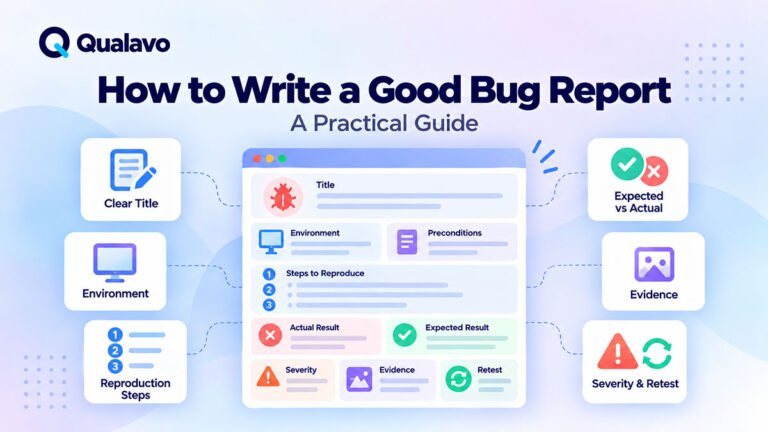
How to Write a Good Bug Report: A Practical Guide
A Practical Bug Report Template
A useful website bug report can follow this structure:
Title
Environment
URL / Location
Preconditions
Steps to Reproduce
Expected Result
Actual Result
Severity
Reproducibility
Evidence
Notes
Retest Result
Not every defect requires every field.
But this provides a strong baseline for consistent reporting.
1. Bug Title
The title should describe the problem clearly enough that someone can understand the basic issue without opening the full report.
Avoid vague titles such as:
- Form issue
- Mobile bug
- Checkout broken
- Button doesn’t work
- Layout problem
A better title explains:
where + what happens + condition
Examples:
Contact form does not submit on Safari after completing all required fields
Mobile navigation overlaps the page title at 375px viewport width
Checkout total does not update after removing an item from the cart
Password reset email links to the staging environment
A clear title also makes bug lists easier to scan and search.
2. Environment
Environment information helps the team understand the conditions under which the issue occurred.
Typical fields include:
- environment;
- browser;
- browser version;
- operating system;
- device;
- viewport;
- user role;
- build or release version.
Example:
Environment: Staging
Browser: Safari 18.6
Operating System: macOS
Viewport: 1440 × 900
User Role: Standard User
For mobile:
Device: iPhone 15
Browser: Safari
Operating System: iOS
Orientation: Portrait
Without environment information, browser-specific and device-specific defects can be difficult to reproduce.
For consistent environment coverage, see:
Browser and Device Test Matrix: How to Choose What to Test
3. URL or Location
Record where the issue occurs.
For websites, this often means the page URL.
Example:
For applications, you may also identify:
- screen;
- modal;
- module;
- workflow;
- dashboard section.
Example:
Location: Dashboard → Settings → Notifications
This helps someone reach the affected area quickly.
4. Preconditions
Preconditions explain the state required before reproduction begins.
Examples:
- user is logged in;
- user has an Administrator role;
- cart contains one product;
- account email is unverified;
- coupon is active;
- specific feature flag is enabled.
Example:
Preconditions:
- User is logged in.
- Cart contains one product.
- Shipping country is set to Germany.
Do not include preconditions if none are required.
5. Steps to Reproduce
Steps to reproduce are one of the most important parts of a defect report.
They should be:
- clear;
- numbered;
- minimal;
- repeatable.
Example:
- Open the Contact page.
- Enter a valid name.
- Enter a valid email address.
- Enter a message.
- Click Submit.
- Observe the result.
Avoid:
Go to contact and fill everything out, then submit.
That leaves too much open to interpretation.
Another tester should be able to follow the steps without asking what you meant.
Keep Reproduction Steps Focused
Only include actions needed to reproduce the problem.
If the tester performed 15 unrelated actions before discovering the issue, but only 4 are necessary to reproduce it, document the 4 relevant actions.
This helps developers isolate the problem faster.
6. Expected Result
The expected result explains what should happen when the feature works correctly.
Example:
The form should submit successfully, display a confirmation message, and send the enquiry to the configured recipient.
Expected behavior may come from:
- requirements;
- acceptance criteria;
- designs;
- business rules;
- existing functionality;
- documented specifications.
Avoid:
It should work.
Be specific.
7. Actual Result
The actual result describes what really happened.
Example:
After clicking Submit, the loading indicator appears for approximately two seconds and disappears. No confirmation message is shown, and the enquiry is not received.
The actual result should be factual.
Avoid unnecessary assumptions about the technical cause.
Poor:
The API is broken.
Better:
The form returns an HTTP 500 response after submission.
The second statement describes an observable result.
Expected vs Actual Result
These two fields work together.
For example:
Expected Result:
The user should be redirected to the order confirmation page after successful payment.
Actual Result:
Payment succeeds, but the user remains on the checkout page with a loading indicator.
This immediately shows the gap between intended and observed behavior.
8. Severity
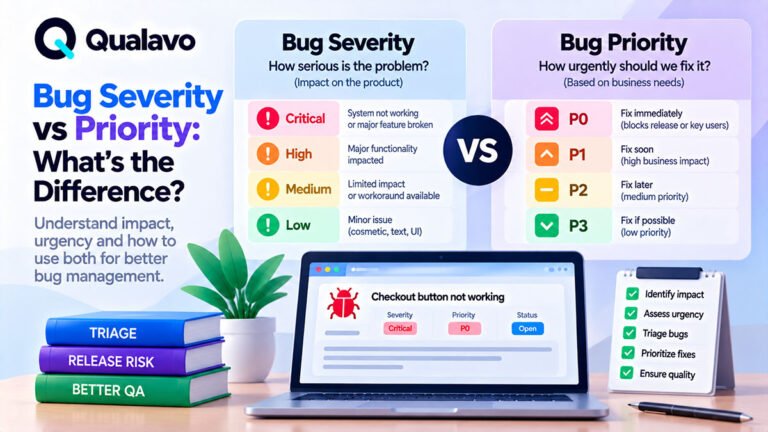
Severity describes the impact of the defect.
A simple severity model may use:
Critical
A release-blocking issue affecting a critical workflow or creating serious risk.
Examples:
- website unavailable;
- checkout completely fails;
- serious permission problem;
- critical data loss.
High
A major feature is significantly affected.
Examples:
- login fails for an important user group;
- primary form does not work in a supported browser;
- mobile navigation unusable.
Medium
The defect affects functionality or usability but does not fully block the primary journey.
Examples:
- incorrect validation;
- secondary feature issue;
- moderate layout problem.
Low
Minor visual, content, or usability defect.
Examples:
- spacing inconsistency;
- small alignment issue;
- typo.
Severity should reflect impact, not how difficult the fix is.
Severity Is Not the Same as Priority
A defect can have low technical severity but high business priority.
For example:
A typo in a legal notice may be technically minor but require immediate correction.
Likewise, a medium defect in a rarely used admin screen may not need urgent work.
Severity describes impact.
Priority describes how soon the team wants it addressed.
9. Reproducibility
If useful, record how consistently the issue occurs.
Examples:
Reproducibility: 5/5
or:
Reproducibility: Intermittent, approximately 2/5 attempts
This can help distinguish:
- consistent defects;
- timing issues;
- race conditions;
- environment-specific problems;
- intermittent integration failures.
If a bug occurs only sometimes, record any pattern you notice.
10. Evidence
Evidence should help another person understand the problem faster.
Useful evidence may include:
- screenshots;
- screen recordings;
- console errors;
- network responses;
- server error messages;
- logs;
- timestamps;
- request IDs.
Screenshot
Best for:
- visual bugs;
- incorrect content;
- layout issues;
- visible error messages.
Screen Recording
Best for:
- interaction problems;
- modal behavior;
- complex workflows;
- timing issues;
- disappearing elements.
Technical Evidence
Useful for:
- API failures;
- JavaScript errors;
- request failures;
- backend errors.
Only attach evidence that helps.
A large collection of irrelevant screenshots can make a report harder to understand.
Evidence Should Support the Report, Not Replace It
Avoid reports that contain only:
See screenshot.
The written report should still explain:
- problem;
- steps;
- expected behavior;
- actual behavior.
Evidence adds context.
It should not be the entire defect description.
11. Notes
Use a Notes field only when additional context is useful.
Examples:
- works in Chrome but fails in Safari;
- issue began after latest deployment;
- customer reported the same behavior;
- workaround exists;
- related ticket number.
Keep notes concise.
Do not use them to repeat information already documented elsewhere.
12. Retest Result
A strong bug template should also support the end of the defect lifecycle.
After a fix is delivered, record the retest result.
Example:
Retest Status: Passed
Retested On: 22-Sep-2026
Environment: Staging
Browser: Safari 18.6
Result: Original issue no longer reproduces.
Or:
Retest Status: Failed
Result: Form now submits, but the confirmation email is still not delivered.
This creates a clear record of what was actually verified.
Example Bug Report Using the Template
Title
Contact form does not submit on Safari after completing all required fields
Environment
- Staging
- Safari 18.6
- macOS
- 1440 × 900
URL
/contact/
Preconditions
None.
Steps to Reproduce
- Open the Contact page.
- Enter a valid name.
- Enter a valid email address.
- Enter text in the Message field.
- Click Submit.
Expected Result
The form should submit successfully, display a confirmation message, and send the enquiry to the configured recipient.
Actual Result
The loading indicator appears briefly and disappears. No confirmation message appears, and no enquiry is received.
Severity
High
Reproducibility
5/5 attempts
Evidence
- Screenshot attached
- Screen recording attached
- Console error attached
Notes
Issue reproduces in Safari but not in Chrome.
Retest Result
Pending.
Bug Report Template for Visual Defects
Visual bugs often require less functional detail.
Example:
Title
Pricing card buttons are vertically misaligned on mobile
Environment
- Chrome
- Android
- 390px viewport
URL
/pricing/
Steps to Reproduce
- Open the Pricing page.
- Resize to 390px width.
- Scroll to the pricing cards.
Expected Result
CTA buttons should align consistently across pricing cards.
Actual Result
The Professional plan CTA appears approximately 24px lower than the others.
Severity
Low
Evidence
Screenshot attached.
A lightweight template can still produce a useful defect report.
Bug Report Template for Authentication Issues
Example:
Title
Password reset link returns invalid token immediately after request
Environment
- Production
- Chrome
- Windows
Preconditions
Existing active user account.
Steps to Reproduce
- Open Forgot Password.
- Enter registered email.
- Submit request.
- Open the newly received reset email.
- Click the reset link.
Expected Result
The user should be able to choose a new password.
Actual Result
The reset page displays:
Invalid or expired token.
Severity
High
Reproducibility
3/3 attempts
Evidence
Screenshot and timestamp attached.
For broader authentication testing:
How to Test Login, Signup and Password Reset Flows
Bug Report Template for Checkout Issues
Example:
Title
Checkout total does not update after applying valid coupon
Environment
- Staging
- Safari
- iPhone
Preconditions
Cart contains one eligible product.
Steps to Reproduce
- Open checkout.
- Enter valid coupon.
- Tap Apply.
Expected Result
The discount should be applied and the order total should update.
Actual Result
Success message appears, but the order total remains unchanged.
Severity
High
Evidence
Screen recording attached.
For deeper checkout testing:
How to Test an E-commerce Checkout Flow
One Bug Per Report
Avoid combining unrelated defects.
Poor example:
Mobile navigation is broken, contact form has a validation issue, and footer spacing is wrong.
Create separate reports.
Why?
Separate issues may have:
- different severity;
- different owners;
- different fixes;
- different retest results.
One logical defect per ticket keeps tracking cleaner.
Do Not Write the Fix Into the Bug Report
QA should document the problem clearly.
Avoid prescribing technical solutions unless that is part of your role and the fix is certain.
For example:
Avoid:
Change line 421 of the JavaScript file.
Prefer:
Clicking Submit produces no response in Safari.
Developers may identify a different underlying cause.
The report should focus first on behavior and impact.
Use Consistent Terminology
A bug template becomes less useful if every tester uses different language.
Standardize terms such as:
- Critical;
- High;
- Medium;
- Low;
- Open;
- In Progress;
- Ready for Retest;
- Closed.
Consistency helps with:
- filtering;
- reporting;
- dashboards;
- release decisions.
Include Enough Detail, but Avoid Noise
A good defect report is not necessarily long.
Some bugs may need only a few lines.
Others need detailed reproduction steps and evidence.
Use enough information to make the defect:
understandable + reproducible + testable
Then stop.
Do not add paragraphs that do not help investigation or retesting.
Make the Template Fit the Project
Different projects may need additional fields.
For example:
E-commerce
- order ID;
- payment method;
- currency;
- customer type.
SaaS
- user role;
- subscription plan;
- account state;
- workspace.
Agency projects
- client;
- project;
- release;
- assigned owner.
A standard core template can be extended without losing consistency.
Use Bug Templates for Client Communication Too
Structured defect reports are useful beyond the internal QA team.
For client-facing projects, a clear defect record helps stakeholders understand:
- what was found;
- business impact;
- status;
- whether the issue blocks release.
Avoid exposing unnecessary technical noise to clients.
The same underlying data can be summarized differently for different audiences.
For broader client reporting:
QA Executive Summary: What Should It Include?
Connect Defects to Release Decisions
Not every defect should block release.
Before launch, review:
- critical bugs;
- high-severity bugs;
- known issues;
- accepted risk;
- retest status.
A structured bug report provides the information needed for a go/no-go decision.
For release readiness:
Go/No-Go Checklist: Is Your Website Ready to Launch?
A Simple Bug Report Template You Can Reuse
Use this structure:
Title:
[Describe the problem clearly]
Environment:
[Staging / Production]
Browser / Device:
[Browser, OS, device, viewport]
URL / Location:
[Page or module]
Preconditions:
[Any required setup]
Steps to Reproduce:
Expected Result:
[What should happen]
Actual Result:
[What actually happens]
Severity:
[Critical / High / Medium / Low]
Reproducibility:
[Example: 5/5]
Evidence:
[Screenshot / video / logs]
Notes:
[Optional context]
Retest Result:
[Pending / Pass / Fail]
Bug Report Checklist
Before submitting a defect, confirm:
- Title clearly describes the issue.
- Environment is recorded.
- URL or location is included.
- Preconditions are documented if required.
- Steps are clear and reproducible.
- Expected result is specific.
- Actual result is factual.
- Severity reflects impact.
- Evidence is useful.
- Reproducibility is recorded where relevant.
- Only one logical defect is included.
- The report will be usable for retesting.
Make Bug Reporting Repeatable
A bug template is most valuable when everyone uses it consistently.
A repeatable issue workflow might look like:
Find → Report → Triage → Fix → Retest → Close
The template supports the entire lifecycle.
It makes defects easier to:
- understand;
- prioritize;
- assign;
- retest;
- report.
Qualavo Lite includes a structured Simple Bug Report Template together with the core website QA checklist.
Teams that also need structured bug triage, browser/device coverage, and release readiness can extend the workflow with Qualavo Starter.
Final Thoughts
A bug report template should make defects easier to act on.
The most useful reports clearly document:
what happened, where it happened, how to reproduce it, what should have happened, how serious it is, and what evidence supports it.
The template itself does not need to be complicated.
Consistency matters more than the number of fields.
Start with a clear core structure.
Add project-specific fields only when they provide real value.
And make sure every report is useful not only for fixing the issue, but also for retesting it later.
Need a ready-to-use bug reporting and website QA foundation? Explore Qualavo Lite.