What Is Release Readiness? A Guide to Website Launch Decisions
What Is Release Readiness?
Release readiness is the process of deciding whether a website or web application is ready to be deployed to production.
It is broader than asking:
Has testing finished?
A release can technically finish QA and still not be ready to launch.
For example:
- a critical integration may still be unstable;
- a high-impact defect may remain open;
- production configuration may be incomplete;
- rollback may not be prepared;
- a required browser may not have been tested;
- key stakeholders may not understand the remaining risk.
Release readiness brings all of these factors together.
The goal is to answer:
Is the release safe enough to go live?
Release Readiness Is a Risk Decision
A release decision is rarely about perfection.
Most real releases contain some remaining issues.
The important question is:
Are the remaining issues acceptable?
That requires understanding:
- what was tested;
- what passed;
- what failed;
- what remains open;
- who is affected;
- how serious the impact is;
- what happens if production fails.
Release readiness is therefore a risk-based decision, not simply a testing status.
QA Completion Does Not Automatically Mean Release Ready
A QA team may complete its planned test cycle.
That does not necessarily mean the release should go live.
Imagine:
- test execution is complete;
- all planned cases were run;
- one critical payment defect remains.
QA is complete.
The release is not ready.
Another example:
- testing is complete;
- only two low-impact visual issues remain;
- critical workflows pass;
- rollback is ready.
QA is complete.
The release may be ready.
The difference is risk.
What Should Be Reviewed Before Release?
A release-readiness review should usually consider:
- critical user journeys;
- open defects;
- test coverage;
- regression results;
- browser/device coverage;
- accessibility;
- security sanity;
- integrations;
- production configuration;
- backups;
- rollback;
- launch-day verification;
- known limitations.
Not every project needs the same depth.
A small marketing website may require a lightweight review.
A SaaS or e-commerce release may need much deeper controls.
1. Critical User Journeys
Start with the workflows the business cannot afford to lose.
Examples:
Lead-Generation Website
Homepage → Service Page → Contact Form → Lead Received
E-commerce
Product → Cart → Checkout → Payment → Order Confirmation
SaaS
Signup → Verify → Login → Core Action
Booking Website
Service → Availability → Booking → Confirmation
If a critical user journey fails, the release is usually not ready.
2. Open Defects
Review all unresolved defects before launch.
Ask:
- Is any issue release-blocking?
- Does any bug affect a critical workflow?
- Is there a workaround?
- How many users are affected?
- Is the impact understood?
The number of open bugs matters less than their severity and impact.
One critical defect can be more important than 20 minor visual issues.
3. Defect Severity
A practical severity model might use:
Critical
Blocks a core workflow or creates serious risk.
High
Major impact on important functionality.
Medium
Meaningful issue with limited impact.
Low
Minor visual, content, or usability issue.
The exact labels can vary.
Consistency matters more.
4. Severity Is Not the Same as Priority
Severity describes impact.
Priority describes urgency.
A low-severity issue may have high priority if it affects:
- legal wording;
- campaign launch;
- executive visibility;
- a key client requirement.
Release readiness should consider both.
5. Test Coverage
A release decision should reflect what was actually tested.
Ask:
- Were critical pages tested?
- Were forms tested?
- Were supported browsers tested?
- Were important devices tested?
- Were integrations tested?
- Were key roles tested?
Avoid saying:
QA passed.
if large parts of the agreed scope were never tested.
6. Test Limitations
Any important limitation should be visible before release.
Examples:
- live payment could not be tested in staging;
- one required device was unavailable;
- third-party service was down;
- accessibility testing was limited;
- production email could not be verified yet.
These limitations increase uncertainty.
That uncertainty should be part of the release decision.
7. Regression Testing
New fixes can break existing functionality.
Before release, verify:
- important fixes were retested;
- critical workflows were regression-tested;
- related functionality still works;
- no new blockers were introduced.
A release with many unverified fixes is higher risk.
8. Browser and Device Coverage
Release readiness should include agreed environment coverage.
For example:
- Chrome / Windows;
- Safari / iPhone;
- Chrome / Android;
- Edge / Windows;
- Safari / macOS.
The exact matrix should reflect the product.
For planning:
Browser and Device Test Matrix: How to Choose What to Test
9. Accessibility Coverage
If accessibility is part of project requirements, review the completed scope.
Typical checks may include:
- keyboard navigation;
- focus visibility;
- form labels;
- contrast;
- zoom/reflow;
- mobile accessibility.
If accessibility requirements are contractual or regulatory, incomplete coverage may affect launch approval.
For broader guidance:
Website Accessibility Testing Checklist: A Practical QA Guide
10. Security Sanity Checks
Release readiness should include basic security-related verification where relevant.
Examples:
- HTTPS;
- authentication;
- permissions;
- protected routes;
- sensitive data exposure;
- production debug output.
Routine QA is not penetration testing.
But obvious security issues should not be ignored.
For the broader checklist:
Website Security QA Checklist: Basic Checks Before Launch
11. Production Configuration
A release can pass staging QA and still fail in production.
Review:
- environment variables;
- API keys;
- payment credentials;
- email configuration;
- analytics;
- domain;
- HTTPS;
- caching;
- CDN;
- search indexing.
Production readiness is more than application code.
12. Search Engine Settings
For public websites, verify:
- indexing settings;
- robots directives;
- sitemap;
- canonical URLs.
A staging configuration accidentally left in production can create SEO problems.
13. Analytics and Tracking
If business reporting depends on analytics, verify:
- tracking is configured;
- important events are defined;
- production IDs are correct;
- conversion tracking is ready.
A launch can succeed technically while marketing data fails silently.
14. Integrations
Critical integrations should be reviewed before launch.
Examples:
- CRM;
- payment gateway;
- email provider;
- booking system;
- SSO;
- API;
- marketing automation.
Ask:
- Does it work?
- Is production configuration ready?
- What happens if it fails?
15. Data and Migration Readiness
For migrations or major releases, review data carefully.
Check:
- required data migrated;
- records complete;
- relationships correct;
- permissions correct;
- no obvious duplication or loss.
For higher-risk migrations, reconciliation may be necessary.
16. Backup Readiness
Before launch, confirm:
- database backup exists;
- files backup exists;
- backup is recent;
- restore approach is understood.
A backup is useful only if the team knows how to use it.
17. Rollback Readiness
Release readiness should include a recovery plan.
Ask:
- Can the previous version be restored?
- Who performs rollback?
- What triggers rollback?
- How long would recovery take?
- What happens to new production data?
The rollback plan may be simple or complex depending on the project.
But it should exist.
18. Deployment Ownership
Who is responsible for deployment?
Define:
- deployment owner;
- release window;
- communication channel;
- approval point.
Avoid:
Someone will deploy when everything is ready.
Use clear ownership.
19. Post-Deployment Smoke Testing
Release readiness includes knowing what will be tested immediately after deployment.
Typical smoke checks include:
- homepage;
- critical pages;
- form submission;
- login;
- checkout;
- key integration.
For the detailed process:
Post-Deployment Smoke Testing: What to Check After Release
20. Monitoring After Launch
The release does not end when deployment finishes.
Plan what will be monitored.
Examples:
- error logs;
- forms;
- transactions;
- analytics;
- integrations;
- customer reports.
Monitoring is especially important after high-risk changes.
21. Known Issues
Document all known issues that will remain after release.
For each issue, consider recording:
- description;
- severity;
- impact;
- workaround;
- owner;
- target fix date.
Known issues should be visible to stakeholders before launch.
22. Accepted Risk
Sometimes a team intentionally launches with a known issue.
Example:
Footer spacing is incorrect at 320px width.
If the impact is low and accepted, the release may still proceed.
The important thing is that the risk is explicit.
Not forgotten.
23. Stakeholder Approval
The team should know who owns the final release decision.
Possible roles:
- Product Owner;
- Client;
- Release Manager;
- Project Manager;
- Delivery Lead.
QA provides evidence.
The final business decision should have clear ownership.
24. Release Recommendation
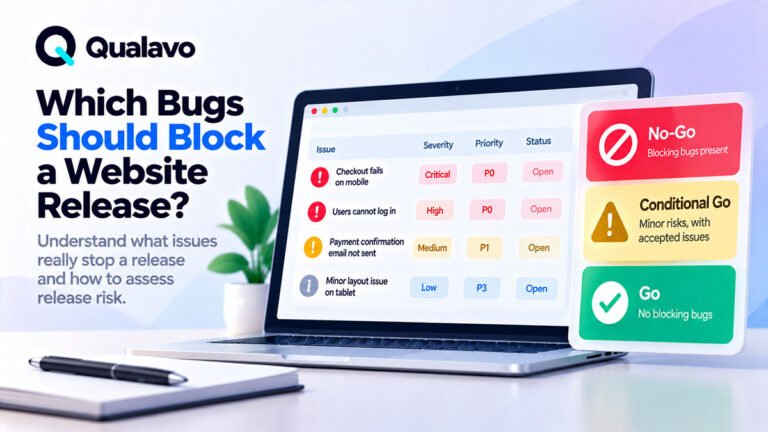
QA or release stakeholders may summarize readiness as:
Go
Release can proceed.
Conditional Go
Release can proceed with explicit conditions.
No-Go
Release should not proceed until critical risk is resolved.
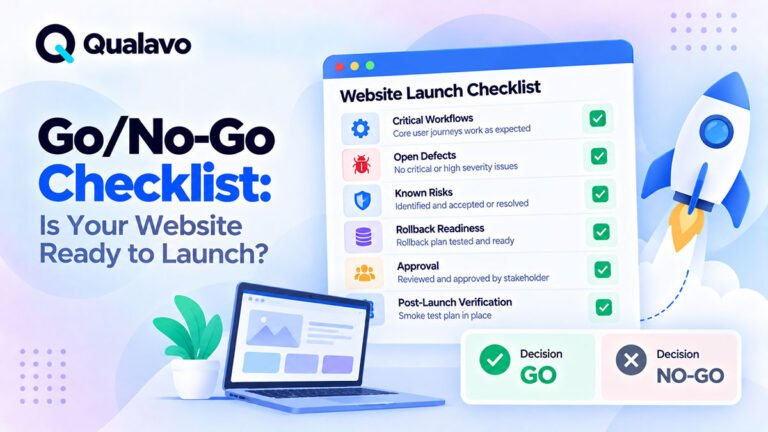
For the full practical checklist:
Go/No-Go Checklist: Is Your Website Ready to Launch?
25. What Does Go Mean?
A Go decision means:
- critical workflows pass;
- no known release-blocking issues remain;
- coverage is acceptable;
- remaining risk is understood;
- deployment and recovery are ready.
Go does not mean:
Zero defects.
It means:
Risk is acceptable.
26. What Does Conditional Go Mean?
Conditional Go can be useful when:
- a non-blocking issue remains;
- a workaround exists;
- extra monitoring is required;
- a fix is scheduled shortly after launch.
Example:
Proceed with release provided the known mobile layout defect is accepted and monitored.
Conditions should be specific.
27. What Does No-Go Mean?
No-Go means remaining risk is too high.
Typical reasons:
- checkout fails;
- login unavailable;
- critical form broken;
- serious security issue;
- incomplete production configuration;
- required testing not completed.
A no-go decision should also explain what must change before release can be reconsidered.
28. Use a Release Readiness Checklist
A release-readiness review can use a simple checklist.
Critical Functionality
- Critical user journeys pass.
- Core forms work.
- Authentication works where applicable.
- Checkout/payment works where applicable.
- Critical integrations work.
Quality
- Critical defects resolved.
- High-impact defects reviewed.
- Important fixes retested.
- Regression testing completed.
- Known issues documented.
Coverage
- Agreed test scope completed.
- Browser/device coverage completed.
- Accessibility scope completed where required.
- Security sanity checks completed.
Production
- Production configuration ready.
- Domain/HTTPS ready.
- Analytics ready.
- SEO settings correct.
- Email configuration ready.
Deployment
- Backup confirmed.
- Rollback understood.
- Deployment owner identified.
- Smoke test prepared.
- Final approver identified.
29. Define Release Criteria Before the Final Day
Do not wait until launch day to decide what is acceptable.
Agree in advance:
- which defect severities block release;
- which workflows must pass;
- what coverage is required;
- who can accept known issues.
This reduces last-minute debate.
30. Use Entry and Exit Criteria
Release readiness is closely connected to QA entry and exit criteria.
For example:
QA Exit Criteria
- critical workflows tested;
- no Critical defects open;
- required High defects resolved;
- regression complete;
- known issues documented.
These criteria make completion more objective.
For test planning:
How to Create a Website QA Test Plan
31. Do Not Use Bug Count Alone
Consider two releases.
Release A
- 12 Low issues
- 3 Medium issues
- 0 High
- 0 Critical
Release B
- 1 Critical issue
Release B may be far riskier despite having fewer bugs.
Release decisions should focus on:
impact, not count.
32. Do Not Use Test Execution Percentage Alone
A test suite may show:
98% passed.
That sounds strong.
But what if the failed 2% includes checkout?
The percentage is not enough.
Always inspect the failed scenarios.
33. Avoid False Precision
Release readiness should not become a fake mathematical score.
For example:
Release readiness score: 92.7%
may look scientific without meaning much.
A clearer summary is often:
All critical workflows pass. No Critical or High defects remain. Two Medium issues are open but do not affect purchase completion.
Use data to clarify risk, not hide it.
34. Document the Decision
Create a simple release record.
Example:
Release: v2.3
Date: 01-Oct-2026
Decision: Go
Critical Workflows: Passed
Open Critical: 0
Open High: 0
Known Issues: 3 Medium, 4 Low
Rollback: Ready
Approver: Product Owner
This creates traceability.
35. Include Testing Limitations in the Decision
Suppose live payment cannot be tested before production.
The release summary should say so.
Example:
Payment functionality passed in sandbox. A live production transaction remains a required launch-day smoke check.
That is more accurate than pretending coverage is complete.
36. Use a QA Executive Summary
For clients or stakeholders, a release-readiness review can be summarized in an executive format.
Include:
- scope;
- coverage;
- major findings;
- open issues;
- risk;
- recommendation.
For the full structure:
QA Executive Summary: What Should It Include?
37. Release Readiness for Marketing Websites
A marketing website may focus on:
- homepage;
- navigation;
- content;
- forms;
- responsive behavior;
- browser coverage;
- analytics;
- SEO;
- production configuration.
Critical question:
Can visitors find information and successfully submit a lead?
38. Release Readiness for E-commerce
E-commerce requires deeper review.
Critical areas include:
- pricing;
- cart;
- discount;
- shipping;
- tax;
- checkout;
- payment;
- order creation;
- email;
- inventory.
For broader e-commerce QA:
E-commerce Website Testing Checklist: What to Test Before Launch
39. Release Readiness for SaaS
SaaS release readiness may include:
- signup;
- login;
- permissions;
- core workflows;
- data persistence;
- subscription;
- integrations;
- regression.
For broader SaaS QA:
SaaS QA Checklist: What to Test in a Web Application
40. Release Readiness for WordPress
WordPress-specific considerations may include:
- plugins;
- theme;
- forms;
- SEO settings;
- caching;
- production email;
- search visibility;
- backups.
For broader WordPress testing:
WordPress QA Checklist: What to Test Before Going Live
41. Agencies Need Consistent Release Criteria
Agencies may handle many client websites at once.
Without standard release criteria, decisions can become inconsistent.
One project may require:
- no High defects;
while another launches with several without discussion.
A standard baseline improves consistency.
For agency QA:
How to Build a Website QA Process for a Digital Agency
42. Release Readiness Is a Team Activity
QA should not carry the entire decision alone.
Release readiness may involve:
- QA;
- Development;
- Product;
- Project Management;
- Marketing;
- Operations;
- Client stakeholders.
Each contributes different information.
43. QA Provides Evidence, Not Business Ownership
QA may say:
Checkout fails for all Safari users.
That is evidence.
QA can also explain the impact.
But the organization should define who ultimately accepts or rejects business risk.
Clear roles make release decisions stronger.
44. Make Release Readiness Repeatable
A practical workflow can be:
Testing Complete → Defects Reviewed → Risk Assessed → Release Decision → Deploy → Smoke Test → Monitor
This makes launch decisions deliberate rather than deadline-driven.
Release Readiness Checklist
Before approving a release, confirm:
- Critical user journeys pass.
- No unresolved release-blocking defects remain.
- High-impact issues have been reviewed.
- Known issues are documented.
- Important fixes are retested.
- Regression testing is complete.
- Agreed browsers/devices were tested.
- Accessibility scope is complete where required.
- Security sanity checks are complete.
- Critical integrations work.
- Production configuration is ready.
- Analytics and tracking are ready.
- Search indexing settings are correct.
- Backup exists.
- Rollback plan is understood.
- Deployment owner is clear.
- Production smoke test is prepared.
- Final release approver is identified.
- Remaining risk is understood.
Make Release Decisions Based on Evidence
A good release decision should be explainable.
Instead of:
It seems ready.
use:
All critical workflows passed, no Critical or High defects remain, browser coverage is complete, production configuration is ready, and rollback has been confirmed.
This is much stronger.
Release Readiness Is Not Bureaucracy
A release-readiness process does not need to become slow or complex.
For a small project, it might be a 10-minute checklist.
For a large SaaS release, it may involve a formal review.
The important thing is that the team considers the right questions before production.
Build Release Readiness Into the QA Process
Do not treat release readiness as a separate activity that appears at the last minute.
A better workflow is:
Plan → Test → Report → Retest → Review Risk → Release Decision
This connects testing directly to launch.
Qualavo Starter includes structured release-readiness and go/no-go resources for teams that need a practical pre-launch decision process.
For more complex projects with deeper release governance, client reporting, and post-launch workflows, Qualavo Professional to the Professional product page.
Final Thoughts
Release readiness is the point where testing becomes a business decision.
The question is not:
Is everything perfect?
The question is:
Do we understand the remaining risk well enough to launch?
A strong release-readiness review considers:
critical workflows, open defects, test coverage, production configuration, rollback, and post-launch verification.
If the important evidence is positive and the remaining risk is acceptable, the release may be ready.
If critical uncertainty or serious defects remain, it may not be.
That is what release readiness is for: making launch decisions deliberate, transparent, and based on evidence.
Need a structured release-readiness framework? Explore Qualavo Starter.