What Is Website QA? A Complete Guide to Website Quality Assurance
What Does Website QA Mean?
A website can look finished and still contain dozens of problems.
A form may fail on mobile. A button may work in Chrome but behave differently in Safari. A checkout flow may break at the final step. A page may look correct on desktop while becoming difficult to use on a smaller screen.
This is where website quality assurance comes in.
Website QA, or website quality assurance, is the structured process of checking a website for functional, visual, usability, compatibility, content, accessibility, and release-related issues before and after it goes live.
The goal is simple: find problems before your users do.
Website QA is more than clicking through a few pages before launch. A proper QA process systematically verifies that the website behaves as expected across the environments and user journeys that matter.
That can include checking:
- navigation and links;
- forms and validation;
- responsive layouts;
- browser compatibility;
- mobile behavior;
- interactive components;
- content and formatting;
- error handling;
- accessibility basics;
- critical business workflows;
- integrations;
- release readiness.
The exact scope depends on the website.
A small marketing website does not require the same testing strategy as an e-commerce store, SaaS application, membership site, or complex WordPress website.
The important part is having a defined process instead of relying on random checks.
Website QA vs Simply Checking a Website
There is an important difference between casually reviewing a website and performing structured QA.
A casual review often looks like this:
Someone opens the website, clicks through several pages, checks that everything appears normal, and reports anything obviously broken.
That can catch major problems, but it is inconsistent.
Website QA introduces structure.
Instead of asking:
“Does the website seem OK?”
the QA process asks specific questions:
- Does the navigation work?
- Do forms validate correctly?
- Can users complete critical workflows?
- Does the website work across the browsers and devices that matter?
- Are errors documented consistently?
- Were fixes retested?
- Are there unresolved issues that should block the release?
This turns testing from an informal final check into a repeatable quality process.
Why Website QA Matters
Website problems affect more than appearance.
They can affect leads, sales, customer trust, support workload, and the success of a release.
Consider a contact form that appears to submit correctly but never delivers the message.
From the website owner’s perspective, the site appears operational.
From the visitor’s perspective, they submitted an enquiry.
But the business never receives it.
A relatively small functional defect can therefore become a lost lead.
The same principle applies to:
- checkout failures;
- broken account creation;
- missing mobile navigation;
- incorrect form validation;
- broken buttons;
- layout problems hiding important calls to action;
- failed integrations;
- incorrect confirmation messages.
The earlier these issues are discovered, the easier they are usually to investigate and fix.
This is why QA should not be treated as an optional final step.
It should be part of the website delivery process.
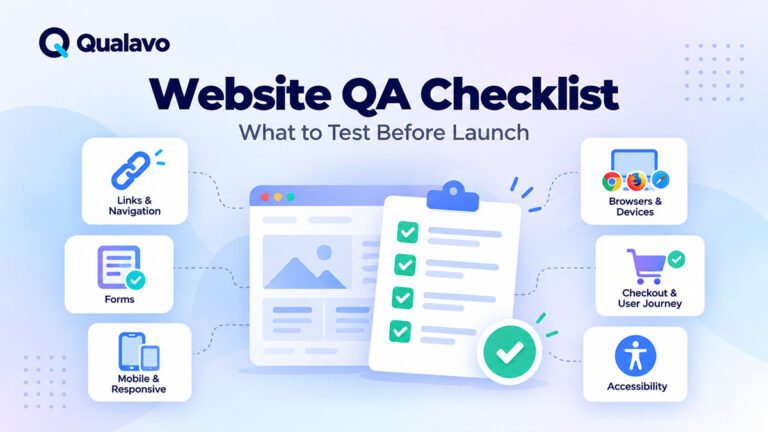
What Should Be Tested During Website QA?
A complete QA scope varies from project to project, but most websites share several important testing areas.
Functional Testing
Functional testing checks whether website features actually work.
Examples include:
- contact forms;
- search;
- filtering;
- login flows;
- buttons;
- menus;
- file uploads;
- account features;
- checkout processes;
- third-party integrations.
The objective is not simply to confirm that an element is visible.
It is to confirm that the user can successfully complete the intended action.
For example, testing a contact form may include:
- submitting valid data;
- submitting invalid data;
- checking required fields;
- verifying validation messages;
- confirming success messages;
- checking whether the submitted information reaches the correct destination.
Visual and Responsive Testing
Modern websites must work across many screen sizes.
A layout that looks excellent on a large desktop monitor may break on a phone or tablet.
Responsive QA typically checks:
- text wrapping;
- navigation;
- buttons;
- forms;
- images;
- cards;
- tables;
- modals;
- spacing;
- horizontal overflow;
- sticky elements;
- mobile menus.
Testing should focus not only on whether the page technically fits the screen, but also on whether it remains usable.
Browser and Device Testing
Browsers do not always render or behave identically.
Chrome, Safari, Firefox, and Edge can expose different issues, particularly around CSS, form controls, JavaScript behavior, and device-specific interactions.
A defined browser and device test matrix helps teams decide which environments need to be tested instead of trying to test every possible combination.
The most important environments should usually be selected based on the website’s audience, analytics, business requirements, and technical risk.
Content QA
Content QA covers more than spelling.
It may include:
- headings;
- page titles;
- dates;
- contact information;
- button labels;
- links;
- image alt text;
- downloadable documents;
- formatting;
- legal text;
- pricing;
- product names;
- consistency between pages.
Placeholder content, outdated text, broken downloads, and incorrect links can easily survive into production if content review is not included in the QA scope.
Accessibility Checks
Accessibility testing helps identify barriers that may make a website difficult or impossible to use for some visitors.
Typical checks may include:
- keyboard navigation;
- visible focus states;
- form labels;
- color contrast;
- alternative text;
- heading structure;
- zoom behavior;
- reflow;
- interactive controls.
Accessibility can become a substantial testing discipline on its own, so teams should clearly define how deep their accessibility review goes.
Error Handling
A good website should behave predictably when something goes wrong.
QA should therefore test more than ideal user behavior.
Questions may include:
- What happens when someone enters invalid information?
- What happens when a required field is empty?
- What happens when an upload fails?
- What happens when a user loses their session?
- What happens when an external service does not respond as expected?
Good error handling helps users understand what happened and what they should do next.
The Basic Website QA Process
A practical website QA workflow can usually be represented as:
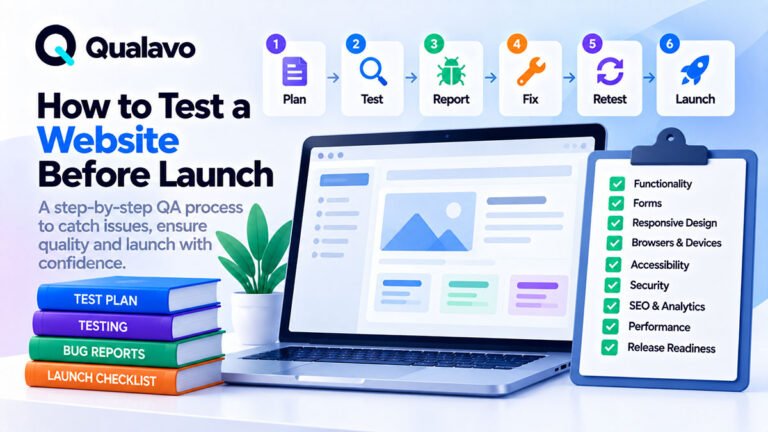
Plan → Test → Report → Fix → Retest → Release

1. Plan
Define what needs to be tested.
Identify:
- important pages;
- critical user journeys;
- supported browsers and devices;
- testing environments;
- responsibilities;
- release criteria.
Large websites should prioritize testing based on business and technical risk rather than treating every page as equally important.
For example, a broken checkout, login flow, or lead form should usually receive higher testing priority than a minor spacing inconsistency on a low-traffic informational page.
2. Test
Execute the agreed checks systematically.
Use a checklist or website QA test plan so that coverage does not depend entirely on memory.
A structured website QA checklist helps create a consistent baseline for every project.
3. Report
When an issue is found, document it clearly enough that another person can reproduce and understand it.
A useful bug report typically explains:
- what happened;
- what was expected;
- how to reproduce the problem;
- where the problem occurred;
- which browser or device was used;
- what evidence is available.
Screenshots and screen recordings can make visual and interaction problems significantly easier to understand.
A good bug report should reduce unnecessary back-and-forth between testers, developers, designers, and project managers.
4. Fix
The appropriate developer, designer, content owner, or project team reviews and resolves the issue.
Not every reported issue necessarily blocks a release.
Teams may need to consider:
- severity;
- business impact;
- user impact;
- available workarounds;
- release timing;
- technical risk.
5. Retest
A fix is not complete simply because code has changed.
The reported issue should be tested again in the relevant environment.
It may also be necessary to check related functionality to make sure the fix did not introduce another problem.
This is where regression testing becomes important.
6. Make the Release Decision
At the end of testing, the team needs to understand the remaining risk.
Critical workflows should work.
Release-blocking defects should be resolved.
Known issues should be documented.
Someone should be responsible for making or approving the release decision.
A structured release readiness process makes this decision more consistent and less dependent on assumptions.
A Practical Example of Website QA
Consider a lead-generation website that is scheduled to launch on Friday.
The critical user journey is:
Landing Page → Call to Action → Contact Form → Confirmation → Lead Notification
A basic QA pass might produce results like these:
| Check | Result | Severity |
|---|---|---|
| Call-to-action button works on desktop | Pass | — |
| CTA is partially hidden on a mobile viewport | Fail | P1 |
| Required email validation works correctly | Pass | — |
| Contact form submits successfully | Pass | — |
| Confirmation message appears after submission | Pass | — |
| Lead notification email reaches the business | Fail | P0 |
At first glance, the website may appear ready because the form can be completed and submitted successfully. But if the notification email never reaches the business, the core lead-generation journey is still broken.
This is the difference between simply checking whether individual elements appear to work and performing structured website QA.
A useful QA process should answer four questions:
- Does it work?
- Does it work in the browsers, devices, and environments that matter?
- Can users successfully complete the website’s critical journeys?
- Is the remaining risk acceptable for release?
Website QA is therefore not just about finding visual defects or broken buttons. It is about verifying complete user journeys and identifying issues that could create real business impact before the website is released.
Website QA Is Not Just for QA Teams
One of the biggest misconceptions about quality assurance is that it requires a dedicated QA department.
It does not.
Freelancers, web developers, designers, digital agencies, product teams, and small businesses can all benefit from structured QA.
The process simply needs to match the complexity and risk of the project.
For a small website, that might mean:
- a concise checklist;
- a consistent bug report template;
- basic browser testing;
- a final pre-launch review.
For a larger client website, the process may require:
- formal test planning;
- browser and device coverage;
- bug triage;
- release readiness criteria;
- structured reporting.
For SaaS, e-commerce, or agency environments, QA can expand further into:
- specialized testing;
- regression monitoring;
- accessibility reviews;
- security sanity checks;
- launch planning;
- client reporting;
- release governance.
Checklist-Based QA vs Random Testing
A checklist does not replace professional judgment.
It solves a different problem: consistency.
Without a defined system, testers often spend too much time on areas they notice naturally and overlook less obvious checks.
A structured checklist creates a baseline.
It also makes repeated releases easier because the team does not need to recreate the entire testing approach every time.
The checklist should not be treated as a rigid script.
Good QA combines a repeatable baseline with critical thinking and exploratory testing.
When Should Website QA Start?
QA should not begin five minutes before deployment.
Quality problems can originate during:
- planning;
- design;
- development;
- content entry;
- configuration;
- integration;
- deployment.
The earlier important risks are identified, the less pressure there is at the end of the project.
A practical approach is to perform QA continuously as features become testable, followed by a structured release review before launch.
After launch, critical functionality should be checked again in the production environment.
This final check is often called a smoke test or post-deployment verification.
Does Website QA Guarantee a Bug-Free Website?
No realistic QA process can guarantee that a website will contain zero defects.
Websites operate across combinations of:
- browsers;
- devices;
- screen sizes;
- user behavior;
- network conditions;
- integrations;
- third-party services.
The objective of QA is therefore not to promise perfection.
It is to reduce risk systematically.
A mature QA process helps teams understand:
- what was tested;
- what problems were discovered;
- what was fixed;
- what remains known;
- whether the remaining risk is acceptable for release.
That is considerably more useful than simply saying:
“Everything looks fine.”
Building a Repeatable Website QA System
The most effective website QA processes are repeatable.
You should not need to invent a completely new testing method for every project.
Start with a core QA framework and adapt it based on the type and risk of the website.
For a straightforward website, a structured checklist and bug reporting process may be enough.
As complexity increases, add:
- formal test planning;
- browser and device coverage;
- release readiness criteria;
- specialized testing modules;
- post-launch monitoring;
- reporting.
Qualavo provides ready-to-use website QA systems designed around different levels of project complexity.
QA Lite
A lightweight starting point for teams that need a structured QA checklist and simple bug reporting foundation.
QA Starter
For teams that need a more complete workflow including bug triage, browser/device testing, and release readiness.
QA Professional
For more complex website projects involving e-commerce, CMS, SaaS, accessibility, security sanity checks, launch planning, monitoring, and client reporting.
QA Agency
For agencies and teams managing QA across multiple clients with standardized workflows, white-label reporting, responsibilities, and release sign-off.
Final Thoughts
Website QA is not simply a final check before publishing a website.
It is a structured method for reducing release risk, finding issues consistently, documenting problems clearly, and making better-informed release decisions.
The process does not need to be unnecessarily complicated.
What matters is that it is:
- defined;
- repeatable;
- appropriate for the website being tested.
If you are just starting, begin with the fundamentals:
plan what matters, test systematically, document what you find, retest fixes, and make release decisions based on evidence rather than assumptions.
From there, your QA process can grow with the complexity of your websites and your team.
Explore Qualavo QA systems and choose the workflow that fits your website projects.